
Graduate students must be registered in courses during each term of their program. Below, you will find a step-by-step guide on how to register for courses, along with a list of frequently asked questions and program-specific registration notes.
Students are encouraged to email their Graduate Program Contacts for questions about the course registration process and requirements for their program.
How to register for courses

Step 1: Review your program requirements
Students can review their degree requirements in the Graduate Calendar, which holds the most current information on programs and courses, as well as rules and regulations as reflected on the Academic Regulations page.
Programs will typically send further details about your registration closer to your start date. Students in research-based programs should ensure they are registered in their Major Research Project, Thesis, or Dissertation course in each term as outlined in their program handbook.
Please review the FAQs below to assist with understanding Brock’s course codes.
Step 2: Plan your schedule for the upcoming term
Use the Graduate Academic Timetable to plan your schedule. The timetable lists all courses scheduled to run in the upcoming term, and includes details about course start and end dates (i.e. course durations), days/times of offerings, and instructor information. It also includes details about course components and modes of delivery.
The timetable is typically published in early June for Fall and Winter registration, and in February for Spring registration. Registration open and close dates are noted on the Important Dates page.
When building your schedule, note that classes at Brock end at least ten minutes early to allow for travel time between classes if needed. The Course Planning screen in your Brock Portal will show the number of spaces available in each course to further assist with your planning.
Common durations for Fall and Winter courses are as follows:
- Duration 1 (D1): The course runs across both the Fall and Winter terms
- Durations 2 and 4 (D2 and D4): The course runs in the Fall term only
- Durations 3 and 5 (D3 and D5): The course runs in the Winter term only
Step 3: Register for your courses
Please check the Important Dates page for registration open and close dates for each term’s duration, as well as course drop and withdrawal deadlines you’ll need to follow if making changes to your registration.
When registration opens, you can log in to your Brock Portal and navigate to the Register screen to begin selecting your courses. Select your program of study, complete your declaration form, and begin typing course codes to add available offerings. Each course added will appear in the ‘List of Registered Courses’ at the bottom of the screen. If registration in a given course was unsuccessful, a red error message will appear with further instructions. Additional course registration details are here.
You can then refer to your Student Schedule in the Brock Portal to view the room locations of your in-person courses.
❗Some courses require permission before registering. Check the Graduate Calendar for applicable restrictions, and contact your program if you are unable to register.
After registering, your program will review your courses for approval. If a course is not approved, you will be de-registered. Please continue to check the Courses and Marks screen in your Brock Portal to confirm which courses you are registered in.

Step 4: Pay your tuition
Tuition fees are typically posted to your Brock Portal in the Student Financial History screen within one month of the start of the term. Be sure to review applicable Important Dates, information on Making a Payment, and Funding Information.
Additional questions can be directed to [email protected].

Step 5: Get ready to begin your courses!
Course instructors will post more information about your course on Brightspace within the first week of the term (e.g. the syllabus, course content, required textbooks, assessment details, etc.). The Brock Campus Store will provide a list of all courses and associated course materials as assigned by your instructors.
Note that course communications will be sent only to your Brock email.
Forms related to your registration and student status can be found on the Student Forms webpage. If you require confirmation of your enrolment, this can be requested through the Brock Portal.
Frequently Asked Questions
Example: AHSC 5P17
- AHSC: denotes the program offering the course, e.g. Applied Health Sciences.
- 5: denotes the level of the course, e.g. “5” is master’s, “7” is doctoral.
- P: denotes the credit weight of the course, e.g. “F” is 1.0 credit, “P” and “Q” are 0.5 credit, “V” is 0.5 credit (variable topics course).
- 17: denotes the program’s assigned number for the course.
Further details about Brock’s course codes are outlined in the Graduate Calendar within the ‘Understanding the Calendar’ page.
A course duration is the period of time over which a course is taught. Because courses are offered at different points throughout the academic year and at different lengths, durations dictate the exact start and end dates of a course in a given term.
The durations for each course offered within a given term are outlined in the Academic Timetable. Note that the course drop and withdrawal deadlines you must follow if wanting to make changes to your registration are dictated by the course’s duration.
The following acronyms outline the specific course components and modes of delivery available at Brock, as listed in the timetable for each course offered in a given term. Note that not all courses are offered in every session. Modes of delivery for individual courses are subject to change, and can differ across sections, terms, and years.
LEC – Lecture: A large or small educational talk delivered to students in-person on campus.
ASY – Asynchronous Online: No required on-campus components, including assessments. The course will have a set start and finish date, and set due dates for assignments, possibly including a scheduled final exam delivered online.
ASO – Asynchronous Online with On-Campus Exams: No required on-campus components, with the exception of examinations. The course will have a set start and finish date and set due dates for assessments (possibly including scheduled midterm and final exams delivered on campus).
SYN – Synchronous Online: Delivered through web or video conferencing at regularly scheduled meeting times, with assessments also delivered online.
SYO – Synchronous Online with On-Campus Exams: Delivered through web or video conferencing at regularly scheduled meeting times, with the exception of scheduled midterm and final examinations delivered on campus.
BLD – Blended – Mixed Location: Include both online and on-campus components. Typically, at least 50% on the total course delivery occurs on campus, while the online components may be synchronous or asynchronous online.
ONM – Blended – Online Mixed: Delivered fully online, with both synchronous and asynchronous components.
HYF – Hyflex: Offered simultaneously in on-campus and online environments.
LL – Lecture/Lab: A large or small educational talk delivered to students on campus followed by small-group learning to apply course concepts in a controlled setting (typically affiliated with a specific technology and/or facility).
LAB – Laboratory: Application of course concepts in a controlled setting (typically affiliated with a specific technology and/or facility).
SEM – Seminar: A small-group learning activity that allows for the discussion and application of course concepts on-campus.
TUT – Tutorial: A small-group learning activity that allows for application of course concepts.
PRO – Project: Independent study with a faculty member(s), e.g. thesis, major research paper, etc.
FLD – Field Course: Include fieldtrips and/or field work within Canada. An in-class component may be scheduled on campus in advance of and/or following the field experience.
IFT – International Field Experience: Include fieldtrips and/or field work outside of Canada. An in-class component may be scheduled on-campus in advance of and/or following the field experience.
INT – Internship: Participation in discipline-specific, supervised, full-time work during the study period. A set number of hours/days/weeks may be required to be completed by the student.
CLI – Practicum (Clinic): Supervised, practice-based experience in employment related to the field of study. A set number of hours/days/weeks may be required to be completed by the student.
Some courses are restricted to students enrolled in specific graduate programs; such restrictions are outlined in the Graduate Calendar entry for the course, and in the timetable. Further details about Brock’s course descriptions are outlined in the Graduate Calendar within the ‘Understanding the Calendar’ page.
If you are interested in taking a course that is not open to students in your program, you may require a course override, or permission of the program director for you to be able to register.
The Important Dates page notes registration open and close dates for each term’s duration, as well as course drop and withdrawal deadlines you’ll need to follow if making changes to your registration.
You may add, drop, or change courses via the Brock Portal only until the registration close dates for each session. If you wish to make changes after the registration system is closed, a Course Registration/Withdrawal Form must be submitted to your Graduate Program Contacts for approval. Note the last day to withdraw without academic penalty for all applicable durations in the current term.
You can log into the Brock Portal and select the Courses and Marks screen in the menu on the left-hand side to see all courses you have registered in or taken at Brock to date, along with their associated final grades if complete. You can also refer to your Student Schedule in the Brock Portal for room locations and timing, with asynchronous offerings listed at the bottom if applicable.
Course location and scheduling are available in your Brock Portal under Student Schedule, with asynchronous offerings listed at the bottom, if applicable. Classes taking place on campus will have a “Location” field, denoted by a building code and room number. Building codes are available in the Interactive Campus Map.
Note that classes at Brock end at least ten minutes early to allow for travel time between classes if needed.
Students are encouraged to email their Graduate Program Contacts for questions about the course registration process and requirements for their program.
Questions about specific course details can be directed to the course instructors as listed in the timetable (contact information is in Brock’s Online Directory).
You can request to take an elective course offered by another graduate program, as long as you obtain approval from your Graduate Program Director (GPD) and your supervisor (if applicable). Please refer to the course’s restrictions outlined in the Graduate Calendar and Academic Timetable for further details.
You must then obtain approval from the GPD of the program offering the graduate course, as their program will have to provide you with an override before you can register. Approval for undergraduate courses must come from the course instructor.
If the course is to be declared as an Extra or Audit course, please inform your GPD so this can be added to your Brock Portal accordingly.
Please consult with your Academic Advisor before pursuing registration in a graduate course.
As you will not be able to register via your Brock Portal, you must complete the Course Registration/Withdrawal Form and ensure it is signed by the Graduate Program Director (GPD) of the program who owns the course, and the course instructor. For processing, please send the form to the Office of the Registrar and Enrolment Services at [email protected].
Program-specific registration notes
MSc and PhD Biological Sciences students must submit a completed and signed Registration Approval Form to the Graduate Program Director in MC F234. Please note that courses must be registered online before they can be approved. The form can be downloaded from here.
MSc and PhD Biotechnology students must submit a completed and signed Registration Approval Form to the Graduate Program Director in MC F234. Please note that courses must be registered online before they can be approved. The form can be downloaded from here.
Master of Business Economics (MBE) students who wish to take an MBAB course offered by the Goodman School of Business must contact the Goodman Graduate Program Director for an override. MBE students should not contact course instructors directly.
MSc and PhD Chemistry students must submit a completed and signed Registration Approval Form to the Chemistry Graduate Program Director. Please note that courses must be registered online before they can be approved. The form can be downloaded from here.
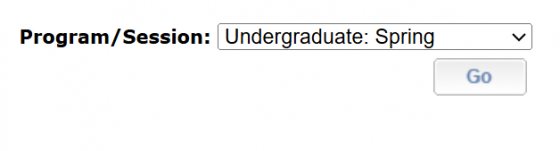
For the first three terms of the Bachelor of Nursing / Master of Nursing program (BN/MN), students will be registering as an undergraduate student. Thus, in the ‘Register’ screen in the Brock Portal, students should select “Undergraduate” when prompted to select their program/session:
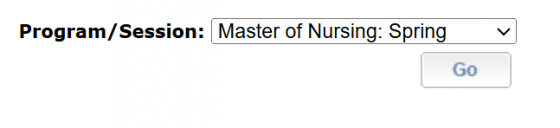
In the final two terms of the BN/MN program, students are to register in graduate courses, and should select their master’s program on this screen when registering:
MSc Mathematics and Statistics students must submit a completed and signed Registration Approval Form to the Graduate Program Director and the Graduate Program Coordinator. Please note that courses must be registered online before they can be approved.